
 EN
EN
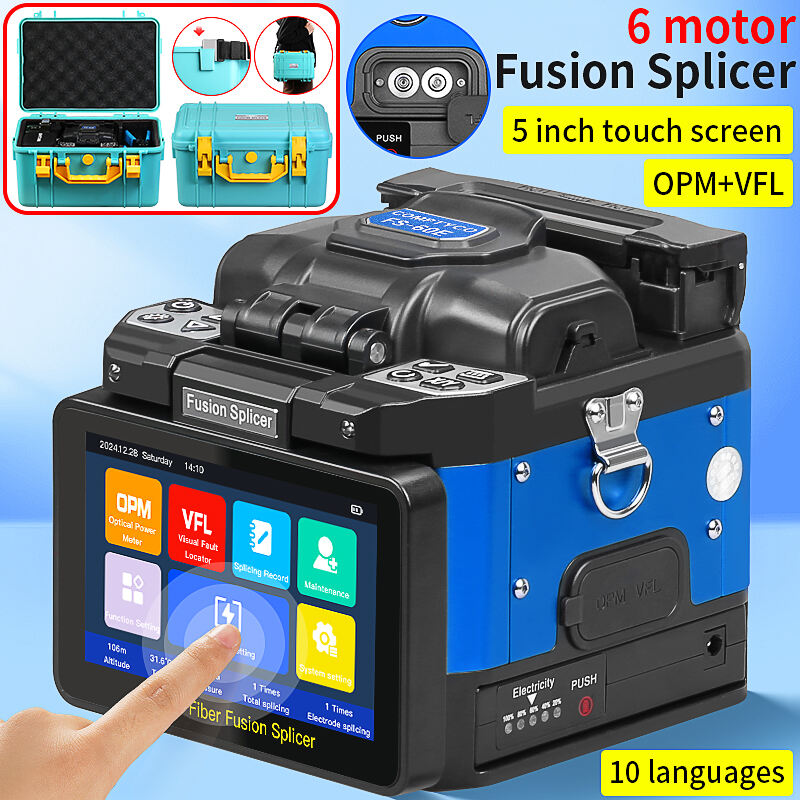
Um fusiônio óptico de fibra é um instrumento de precisão na construção de redes de comunicação modernas. Sua manutenção afeta diretamente a qualidade das emendas, a vida útil do equipamento e os custos do projeto. Especialmente para modelos avançados de 2025 como o Comptyco AUA-70F , L-90C , A-5 , e FS-60E , a manutenção adequada não apenas garante emendas com perda ultra baixa abaixo de 0,02 dB, mas também prolonga significativamente a vida útil do equipamento. Este guia fornece um plano de manutenção abrangente e prático.
Manutenção Diária: O Alicate para Condição Ideal do Equipamento
Procedimentos de Limpeza: Tarefas Diárias Obrigatórias
-
Limpeza do V-Groove (Deve ser realizado após cada uso)
Passe suavemente a haste de limpeza dedicada no canal V 3 a 5 vezes.
Para a estrutura do tipo flip do L-90C, certifique-se de que o grampo esteja completamente aberto antes da limpeza.
Verifique a presença de partículas residuais de adesivo ou detritos; use ar comprimido, se necessário.
-
Limpeza e Inspeção do Eletrodo
Limpe com uma haste de limpeza de eletrodo a cada 50 emendas.
Inspecione as pontas dos eletrodos quanto à simetria e ausência de oxidação (modelos com 6 motores, como o AUA-70F, são particularmente sensíveis à condição dos eletrodos).
Ajuste ou substitua imediatamente se forem encontrados espaçamentos anormais entre eletrodos ou pontas arredondadas.
-
Limpeza da Tela e Carcaça
Limpe a tela sensível ao toque de 5 polegadas com um pano de microfibra.
Evite pulverizar álcool diretamente nas teclas de modelos com botões físicos, como o FS-60E.
-
Manutenção do Grampo de Fibra
Verifique regularmente se a tensão da mola está normal.
Para o mecanismo de abertura do L-90C, adicione mensalmente uma quantidade mínima de lubrificante para instrumentos de precisão.
Manutenção Profunda Semanal
-
Verificação de Calibração do Sistema Óptico
Teste a precisão do sistema utilizando fibra de calibração padrão.
Verifique se o foco da câmera está nítido (especialmente para modelos com tela sensível ao toque como o A-5, onde a clareza da exibição afeta diretamente o julgamento).
-
Limpeza do Aquecedor
Remova fragmentos residuais de mangas termorretráteis do compartimento de aquecimento.
Teste se o tempo de aquecimento está normal (o padrão deve permanecer entre 25 e 35 segundos).
Cronograma de manutenção preventiva
| Item de manutenção | Freqüência | Ferramentas Necessárias | Observações Específicas por Modelo |
|---|---|---|---|
| Limpeza do V-Groove | Diariamente / A cada 8 horas | Hastes de limpeza dedicadas, ar comprimido | O L-90C exige limpeza adicional dos trilhos-guia do mecanismo flip |
| Limpeza do eletrodo | A cada 50 emendas | Haste de limpeza do eletrodo, lupa | AUA-70F recomendado a cada 40 limpezas (alta precisão exigida) |
| Manutenção da bateria | Semanal | Testador de Bateria | A-5 (7800mAh) e FS-60E (6700mAh) exigem ciclos completos de descarga/carga |
| Calibração completa | Mensalmente ou a cada 500 emendas | Fibra de calibração, verificador padrão | Todos os modelos com 6 motores devem ser calibrados regularmente |
| Verificação de Atualização de Software | Trimestral | Conexão à Internet, armazenamento USB | Verifique o site oficial da Comptyco para obter o firmware mais recente |
| Serviço Profissional | Anualmente ou a cada 2000 emendas | Técnico Profissional | Inclui ajuste de precisão do motor, calibração do sistema óptico, etc. |
Manutenção Detalhada dos Componentes Principais
1. Gestão de Eletrodos: O Núcleo da Qualidade de Emenda
Critérios de Substituição :
Deve ser substituído a cada 1500-2000 emendas.
-
Substitua imediatamente se:
A perda de emenda exceder consistentemente 0,05 dB.
A ponta do eletrodo apresentar desgaste significativo (aumento no diâmetro de 0,2 mm).
O arco estiver instável ou exigir aumento da intensidade do arco.
Passos para substituição (para modelos de 6 motores) :
Selecione o modo "Substituição de eletrodo" no menu.
Solte o parafuso de fixação com uma ferramenta dedicada.
Instale o novo eletrodo, garantindo o posicionamento correto.
Realize a calibração automática do espaçamento do eletrodo.
Realize uma emenda de teste para verificar o desempenho.
2. Manutenção do Sistema de Bateria: Garantindo Confiabilidade no Local
Cuidados com a Bateria de Lítio (especialmente para A-5 e FS-60E) :
Evite descarga completa: carregue quando a capacidade restante for de 20%.
Armazenamento prolongado: mantenha o nível de carga em 50%, realize um ciclo de carga/descarga a cada 3 meses.
Gestão térmica: não carregue em ambientes abaixo de 0°C ou acima de 45°C.
Use o carregador original: evite danificar o circuito de gerenciamento da bateria com voltagem instável.
Dicas para Otimizar a Vida Útil da Bateria :
Reduza o brilho da tela (pode economizar até 30% de energia).
Desative funções não utilizadas (por exemplo, Wi-Fi, Bluetooth).
Use o modo de suspensão adequadamente.
3. Cuidado com o Sistema Óptico: Garantindo Foco Preciso
Manutenção da Câmera e da Lente :
Limpe a lente mensalmente com uma escova para lentes.
Evite trocar a fibra em ambientes empoeirados.
Verifique regularmente se a função de foco automático está funcionando corretamente.
Calibração do Microscópio :
Calibre a ampliação trimestralmente utilizando fibra padrão.
Garanta uma exibição precisa dos eixos X e Y, especialmente para modelos de alta precisão como o AUA-70F.
Guia de Manutenção por Estação
Ambientes de Alta Temperatura no Verão (35°C) – Pontos Importantes
Proteção contra Superaquecimento : Não exceda 30 emendas consecutivas; permita que o equipamento descanse e esfrie.
Gestão de Bateria : Evite a exposição direta ao sol; altas temperaturas reduzem permanentemente a capacidade da bateria.
Controle de umidade : Use um agente desumidificante para manter o interior do equipamento seco.
Ambientes de Baixa Temperatura no Inverno (<5°C) - Pontos Importantes
Requerimento de Pré-aquecimento : Aguarde 5-10 minutos após ligar para que a temperatura interna se estabilize.
Isolamento da Bateria : A capacidade da bateria diminui em 40% em baixas temperaturas; mantenha as baterias sobressalentes aquecidas.
Adaptação do Eletrodo : Pode ser necessário aumentar a intensidade do arco em 10-15% em baixas temperaturas.
Manutenção em Ambientes Empoeirados/Arenosos
Prevenção do pó : Cubra com uma capa protetora contra poeira durante as pausas entre usos.
Aumento da Frequência de Limpeza : Dobre a frequência de limpeza dos sulcos em V.
Inspeção do selo : Inspeccione regularmente as tiras de vedação nas juntas do equipamento.
Solução de Problemas e Diagnóstico
Problemas Comuns - Soluções Rápidas
Problema 1: Aumento Súbito na Perda de Emenda
Verifique a vida útil dos eletrodos (causa provável em 85% dos casos).
Limpe os sulcos em V e as braçadeiras de fibra.
Verifique a qualidade do corte da fibra.
Problema 2: Equipamento não liga ou desliga repentinamente
Verifique os contatos da bateria (problema comum nos modelos A-5 e FS-60E).
Teste a saída do adaptador de energia.
Reinicie o sistema (consulte o manual do usuário).
Problema 3: Exibição Anormal na Tela
Reinicie o dispositivo.
Verifique as conexões de cabo (especialmente para modelos com botões físicos como L-90C e FS-60E).
Se o problema persistir, o conjunto da tela sensível ao toque pode precisar ser substituído.
Problema 4: Aquecedor Não Funciona ou Aquece de Forma Irregular
Limpe objetos estranhos da ranhura de aquecimento.
Verifique o valor da resistência do aquecedor.
Sensor de temperatura de ensaio.
Diagnóstico profissional: Utilização de ferramentas integradas
Os modernos splicers Comptyco apresentam funções avançadas de autodiagnóstico:
Auto-teste do sistema execute um diagnóstico completo no menu de configurações.
Registros de desempenho : Ver dados históricos de emplaçamento para analisar tendências de desempenho.
Teste do sensor verifique se todos os sensores estão a funcionar corretamente.
Manutenção de software e firmware
Importância das Atualizações Regulares
Otimização de Desempenho : Os fabricantes otimizam algoritmos de emenda por meio de atualizações.
Adição de Novo Recurso : Pode adicionar suporte para novos tipos de fibra.
Correção de Erros : Resolve problemas conhecidos e melhora a compatibilidade.
Procedimento de Atualização
Baixe o firmware mais recente do site oficial da Comptyco.
Transfira para o dispositivo via USB.
Selecione "Atualização de Firmware" nas configurações do sistema.
Mantenha a fonte de alimentação estável até a atualização ser concluída.
Melhores Práticas para Armazenamento e Transporte
Armazenamento diário
Armazenar na caixa original à prova de choques.
Ambiente de armazenagem: temperatura 15-25°C, umidade 30-70%.
Evite armazenar com produtos químicos.
Proteção do transporte no local
Usar almofadas absorvedoras de choques durante o transporte do veículo.
Evite empilhar outros equipamentos em cima.
Usar caixas isoladas/de proteção em condições climáticas extremas.
Análise do retorno do investimento: o valor económico de uma boa manutenção
Economia direta de custos
vida útil do eletrodo estendida em 30-50% (economia anual de 200-400 dólares).
redução de 50% na frequência de reparos (economia anual de 300-600 dólares).
vida útil da bateria estendida em 40% (economia de 150-250 dólares ao longo de dois anos).
Aumento de Valor Indireto
Qualidade estável de emenda reduz retrabalho.
Maior disponibilidade de equipamentos garante prazos do projeto.
Estende a vida útil dos equipamentos em 2-3 anos.
Construindo uma Cultura de Manutenção: Sugestões de Gestão de Equipe
Desenvolver Procedimentos Padronizados : Crie listas de verificação dedicadas para manutenção de cada modelo.
Treinamento e Certificação : Garanta que cada operador domine as habilidades básicas de manutenção.
Sistema de Registro de Manutenção : Use ferramentas digitais para acompanhar o histórico de manutenção de cada dispositivo.
Gestão de Inventário de Peças de Reposição : Mantenha estoque mínimo de peças críticas (eletrodos, ferramentas de limpeza).
Conclusão: Manutenção como Base da Garantia de Qualidade
A manutenção do fusor não é um adicional opcional, mas um elo essencial para garantir a qualidade da construção da rede. Seja o alto desempenho do AUA-70F com alta precisão, o design exclusivo do L-90C, o econômico e confiável A-5 ou o robusto FS-60E, a manutenção adequada permite que esses dispositivos avançados funcionem em seu melhor desempenho.
Estabelecer hábitos sistemáticos de manutenção não apenas protege o seu investimento, mas também garante que cada emenda atenda aos mais altos padrões da indústria. Na era atual de rápido desenvolvimento das redes de fibra óptica, a manutenção completa dos equipamentos é uma das habilidades mais valiosas para técnicos profissionais e uma garantia crucial para a construção de infraestruturas de comunicação de alta qualidade.
Lembre-se: A melhor reparação de fusora é a manutenção preventiva realizada antes de ocorrer uma falha. Comece a implementar essas práticas de manutenção hoje. Seu equipamento funcionará por mais tempo e em melhores condições, gerando maior valor para você.
Sumário
- Manutenção Diária: O Alicate para Condição Ideal do Equipamento
- Cronograma de manutenção preventiva
- Manutenção Detalhada dos Componentes Principais
- Guia de Manutenção por Estação
- Solução de Problemas e Diagnóstico
- Manutenção de software e firmware
- Melhores Práticas para Armazenamento e Transporte
- Análise do retorno do investimento: o valor económico de uma boa manutenção
- Construindo uma Cultura de Manutenção: Sugestões de Gestão de Equipe
- Conclusão: Manutenção como Base da Garantia de Qualidade